Auto-Share Fix: Tracing a Cross-Org Bug Through 700+ Script Steps
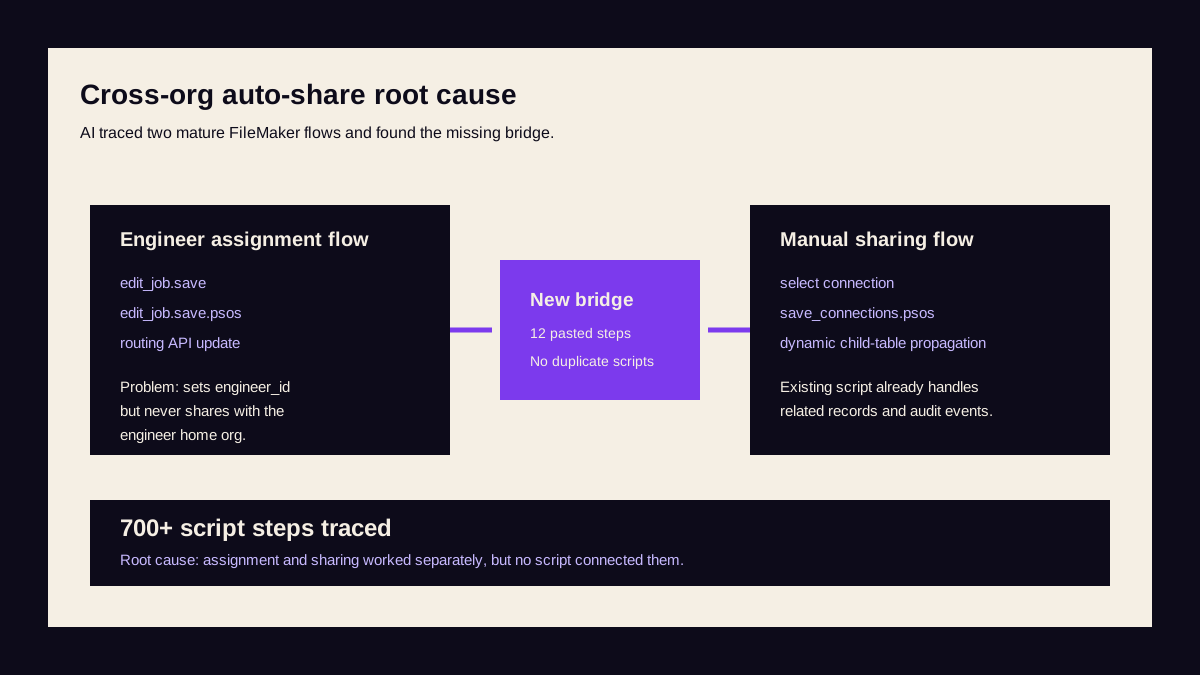
Evidence Snapshot
The useful output was not "AI found a bug." It was a traceable explanation of two production script flows, a named insertion point, a paste-ready fmxmlsnippet, and a test plan that matched the existing FileMaker sharing architecture. The fix reused the system's mature propagation script rather than duplicating logic across another branch.
The Problem
A multi-tenant field service management platform was originally built on FileMaker by the team behind N90 Labs — 1,235 scripts, 154 tables, 529 layouts, 729 relationships, 12 privilege sets, processing jobs across hundreds of connected organisations. After a decade in production, the platform was extracted to a modern stack. This case study is from the FileMaker codebase.
A production FileMaker platform manages jobs across multiple organisations. Organisations can form connections and share engineers between them. When a job is shared with an organisation, that org gets visibility of the job and all related records — customers, GDPR records, invoices, payments, status changes, and dozens of child tables.
Sharing is managed through a multi-value organisation_id field — a newline-delimited list of organisation UUIDs stored on every record.
The bug: when Org B assigns Org A's shared engineer to a job, Org A never gets permission to view that job. The engineer's home organisation is locked out of the work their own person is doing.
A manual workaround existed — users could navigate to the job sharing screen and explicitly share — but it was frequently missed. One specific organisation had complained enough that a hardcoded check was added for their UUID only, blocking assignment with a dialog saying "You must share this job with [org name]". A band-aid that worked for exactly one customer.
The developer's brief to us: one sentence describing the bug.
Phase 1: Understanding the Database Architecture
We started with the DDR XML — a 229MB structural export of the entire FileMaker solution. Our AI toolkit parsed the export and mapped the relevant tables and relationships:
| Table | Purpose |
|---|---|
| ORGANISATIONS | The organisations themselves |
| ENGINEERS | Engineers belonging to organisations, organisation_id identifies home org |
| JOBS | Jobs with multi-value organisation_id controlling visibility |
| CONNECTION_REQUESTS | Governs which organisations can share (pending, accepted, declined) |
| SHARING_EVENTS | Source of truth for sharing state (177,000+ records) |
| CONNECTION_USERS | Tracks which users are shared between connected organisations |
| STATUS_CHANGES | Audit trail of job status changes, also scoped by organisation_id |
We also mapped a naming convention: any table occurrence starting with connections_jobs_ was a child table needing organisation_id updated when sharing changed — dozens of these.
Phase 2: Tracing the Engineer Assignment Flow
We found and read the complete script chain — five scripts handling engineer assignment:
edit_job.new_card_window— opens the job editing card windowOnObjectModifytrigger — validates field changes in real timeedit_job.save(client-side, 200+ steps) — validates form data, commits record, calls server scriptedit_job.save.psos(server-side, full access, 500+ steps) — the main save script: sets engineer ID, calls routing API, handles account manager changesapi_patch_job_without_updating_route— sub-script for routing API integration
Key finding: Step 4 sets engineer_id on the job but never checks whether the engineer belongs to a different organisation. It writes the engineer ID and moves on.
Phase 3: Tracing the Job Sharing Flow
We then traced the complete sharing flow — the existing manual UI that correctly propagates sharing across all related records:
form.connected_organisations.open.button— opens the sharing cardform.connected_organisations.select_connection.button— user selects which org to share withform.connected_organisations.save_connections.button— validates and calls server scriptform.connected_organisations.save_connections.psos(server-side, 300+ steps) — the heavy lifter that:- Updates
organisation_idon the JOBS record - Updates
organisation_idon the CUSTOMERS record - Updates
organisation_idon GDPR records - Uses
TableNames("")+FilterListto dynamically discover all table occurrences matchingconnections_jobs_*and updatesorganisation_idon every matching child record - Creates
SHARING_EVENTSrecords - Creates
STATUS_CHANGESrecords - Updates
shared_status_idsJSON on the job - Optionally sends customer communications
- Updates
update_sharing_events.psos— manages the sharing events audit trail
Phase 4: Finding the Root Cause
With both flows fully traced, the gap was clear:
- The assignment flow (
edit_job.save.psos) setsengineer_idbut never triggers sharing - The sharing flow (
save_connections.psos) handles all complex propagation but is only called from the manual UI - There is no bridge between these two flows
We also found a disabled block in a variant of the sharing script containing guard logic that checked whether an engineer's org would lose access during an unsharing operation — the opposite direction. This confirmed that auto-share-on-assignment logic simply didn't exist.
Phase 5: Designing the Fix
Rather than duplicating the complex sharing logic — which touches dozens of tables dynamically — the fix calls the existing save_connections.psos as a sub-script from within the assignment flow:
- After engineer is assigned and routing API succeeds, check if the engineer belongs to a different organisation
- Look up the engineer's home org using
ExecuteSQLagainst the ENGINEERS table - Check if that org already has visibility (is their UUID already in the job's
organisation_idlist?) - If not, call
save_connections.psoswith appropriate parameters for full sharing propagation - Suppress customer communications during auto-share using the existing
dont_send_customer_commsflag
This approach also made the hardcoded single-org blocking dialog unnecessary.
Phase 6: Generating the Deliverable
Three outputs were delivered:
1. A 12-step fmxmlsnippet XML file — native FileMaker clipboard format, pasteable directly into Script Workspace:
- Comment step explaining the auto-share block
- Outer
Ifchecking engineer isn't empty or "OFF-PLATFORM" Set VariableusingExecuteSQLto look up the engineer's home organisationSet VariableusingExecuteSQLto get the job's current organisation list- Guard condition comment
- Inner
Ifchecking engineer's org isn't already in job's org list - Two
Set Variablesteps building the new connected organisation IDs list - Comment explaining the sub-script call
Perform Scriptcalling existingsave_connections.psoswith a JSON parameter (new org IDs, job ID, current org ID, suppress-comms flag)- Two
End Ifsteps closing both conditionals
2. Exact insertion point in the 500+ step server script — after account manager change handling, before the final Exit Script — ensuring auto-share only fires after routing API success and engineer assignment is committed.
3. Implementation guide with 8 test cases covering cross-org assignment, same-org assignment (should not fire), already-shared jobs (no duplicate), OFF-PLATFORM engineers (should not fire), record propagation verification, sharing events verification, and the previously-blocked org now working without the hardcoded check.
Timeline
| Phase | Work |
|---|---|
| 0:00 | Developer describes the bug in one sentence |
| Phase 1 | Explore table structure, relationships, and connection/sharing model from 229MB DDR |
| Phase 2 | Trace complete engineer assignment script chain (5 scripts, 700+ steps) |
| Phase 3 | Trace complete job sharing script chain (5 scripts, 300+ steps) |
| Phase 4 | Identify root cause: no bridge between assignment and sharing flows |
| Phase 5 | Design fix: call existing sharing script from assignment flow |
| Phase 6 | Generate fmxmlsnippet XML (12 steps), identify insertion point, deliver test cases |
Developer involvement: describing the bug, answering two clarifying questions, and reviewing the output.
What Makes This Notable
This wasn't a simple bug fix. It required understanding a complete multi-organisation sharing architecture — how permissions propagate across dozens of tables, how sharing events are tracked, how the dynamic connections_jobs_* naming convention drives table discovery — before a single line could be written.
The fix reuses existing infrastructure rather than duplicating it. Zero new scripts. Zero code duplication. The 12 injected steps call the battle-tested 300-step sharing script that already handles every edge case in production.
A human developer familiar with the codebase might have reached the same conclusion. But tracing 700+ script steps across two parallel flows, mapping table relationships from a 229MB DDR export, and producing a paste-ready fix with test cases — in a single conversation — is a different category of speed.
Services used in this engagement
Need similar results?
Every engagement starts with understanding your problem. We'll tell you honestly whether we're the right fit.