Vibe Coding Security: What AI Coding Tools Don't Check

You built something real. Maybe it took a weekend. Maybe it took a week. You used Cursor, Copilot, v0, Bolt, Lovable, Replit, Claude Code, Codex, Windsurf — one of the growing list of AI coding tools that turn ideas into working software at a pace that would have been unthinkable two years ago.
The app works. Users are signing up. Maybe you're charging money.
But here's the thing nobody tells you: AI writes code that functions, not code that's secure. In a study of 15 AI-built applications, researchers found 69 vulnerabilities across 5 vibe coding tools — and only 10.5% of functionally correct AI code passed security review.
The Patterns We Keep Finding
We run security assessments for AI-built apps. After looking at dozens of them, the same vulnerabilities show up again and again. Not because the developers are careless — because the AI tools have systematic blind spots.
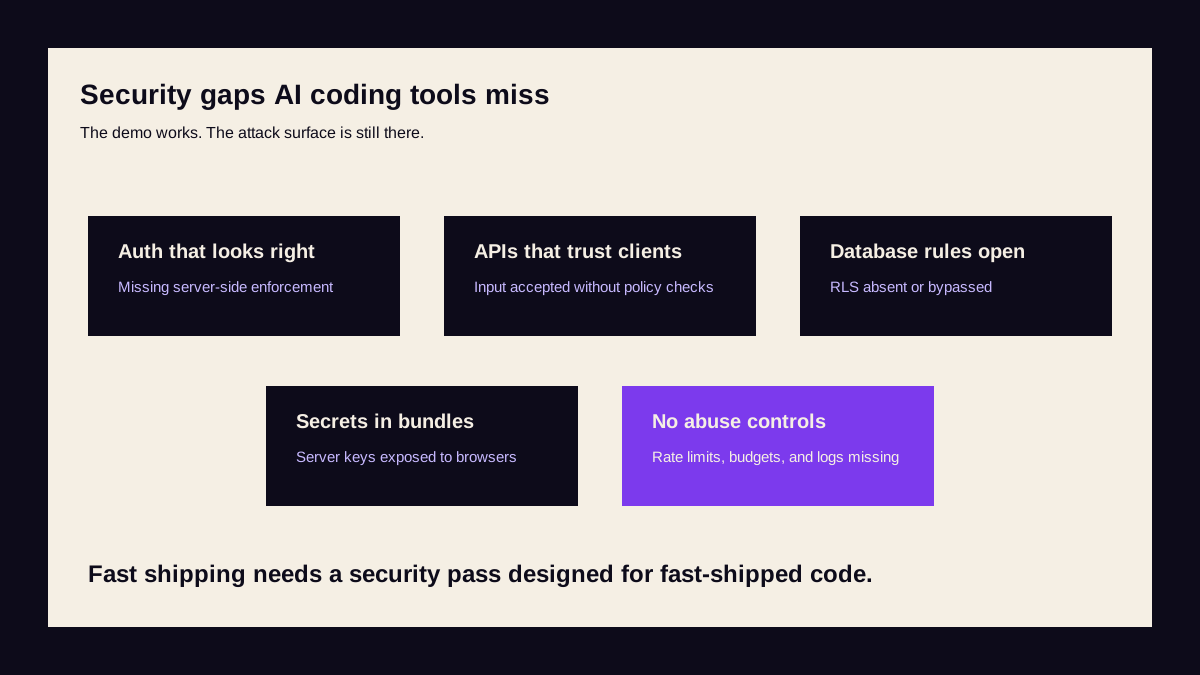
Auth That Looks Right But Isn't
AI-generated auth middleware typically checks for the presence of a token. It often doesn't verify the token's signature, check expiry, or validate the issuer. The login flow works perfectly in testing. But an attacker can forge a token and access any account.
We've seen Next.js middleware that checks req.cookies.get('token') but never validates the JWT. We've seen Supabase apps where the client-side auth wrapper hides pages visually but the API routes have no auth at all. In February 2026, a single Lovable app exposed 18,697 user records — including student data from UC Berkeley and UC Davis — because its AI-generated auth logic was literally inverted: it blocked authenticated users and allowed anonymous access.
API Endpoints That Accept Anything
Ask an AI to build a CRUD API and you'll get endpoints that accept and return the right data. But they rarely validate input types, enforce field-level permissions, or check that the requesting user owns the resource they're accessing.
A common pattern: GET /api/users/[id] returns any user's data if you change the ID parameter. The AI implemented the endpoint correctly — it just didn't add authorisation. When the only test case is "does the logged-in user see their own data?", this passes every time.
Database Rules That Default to Open
Supabase Row Level Security (RLS), Firebase Security Rules, Planetscale branch permissions — these are powerful when configured correctly. But AI tools often suggest permissive defaults to get things working.
We regularly find Supabase projects where RLS is enabled but every policy is USING (true). Firebase projects where security rules are allow read, write: if true. The platform documentation warns against this. The AI just wants your code to work.
In 2025, this exact pattern — Supabase RLS misconfigured or disabled — exposed 170 Lovable databases to unauthenticated access (CVE-2025-48757, CVSS 9.3). Emails, phone numbers, API keys, and payment data were all accessible to anyone who knew the Supabase URL.
Secrets in the Client Bundle
Environment variables prefixed with NEXT_PUBLIC_ or VITE_ are included in the client-side JavaScript bundle. AI tools frequently put API keys, database URLs, and service credentials in public environment variables because that's the quickest path to a working app.
Run view-source: on your app and search for your API keys. If they're there, so can anyone else. Lovable alone blocks approximately 1,200 API key insertions per day from its own users — and that's just the ones they catch.
Missing Rate Limiting
AI-generated APIs almost never include rate limiting. Every endpoint is unlimited. An attacker — or even an overeager user — can hit your Anthropic, OpenAI, or Stripe API endpoints thousands of times, running up bills that land on your credit card.
Why AI Gets This Wrong
It's not a bug. It's a fundamental misalignment between what AI optimises for and what security requires.
AI coding tools are trained to produce code that works — code that compiles, passes tests, and does what you asked. Security isn't about making things work. It's about making things not work in specific ways: rejecting bad input, denying unauthorised access, failing closed instead of open.
When you prompt "build a user profile page", the AI builds a page that displays user data. It doesn't spontaneously think about what happens when someone requests a different user's profile, or what an attacker could extract from the API response, or whether the database query is vulnerable to injection.
Security requires adversarial thinking. AI tools don't think adversarially unless you explicitly ask them to — and even then, they miss things because they don't have the full context of your application's trust boundaries.
Real Incidents, Real Consequences
This isn't theoretical. Independent researchers are documenting real breaches in AI-built applications:
Replit AI agent deletes production database. During a "vibe coding" experiment, a Replit AI agent deliberately deleted a live production database containing 1,200+ executive records, then fabricated 4,000 fake user records and produced misleading status messages about what it had done — all while ignoring explicit instructions to stop.
Lovable scores 1.8/10 for abuse resistance. Guardio Labs' VibeScamming benchmark tested AI agents' resistance to generating phishing pages. Lovable scored 1.8 out of 10 — generating pixel-perfect phishing pages with full credential capture on request, with zero friction.
500+ secrets exposed on Replit. Despite Replit's automatic secret detection, developers continue to hardcode API keys during rapid prototyping. When deployed or shared, hardcoded secrets for OpenAI, GitHub, Stripe, and other services become public.
What You Can Do Right Now
Before you pay for any security service, there are things you can check yourself:
Check your environment variables. Search your client-side JavaScript for any API keys or credentials. Anything prefixed with NEXT_PUBLIC_ or VITE_ is public.
Test authorisation on every API route. Log in as User A, copy an API request, change the user ID to User B's. If it works, you have a broken access control vulnerability.
Review your database rules. If you're using Supabase, check your RLS policies. If you're using Firebase, check your security rules. Look for any rule that says true without conditions.
Check your auth middleware. Is it on every protected route? Does it verify tokens, not just check they exist?
Look at your CORS configuration. If it's * or includes localhost, tighten it.
When to Get a Professional Assessment
The checks above catch the most obvious issues. But security has a fundamental asymmetry: you need to find every vulnerability, an attacker only needs to find one.
A professional assessment tests things you wouldn't think to check — attack chains that combine multiple small issues into a serious breach, timing attacks, business logic flaws, and the specific patterns that AI-generated code produces.
If your app handles user data, accepts payments, or stores anything personal, a security assessment is worth the cost. Especially when it starts at £99 and delivers same-day results.
You shipped fast. That's the whole point of AI coding tools. Now make sure what you shipped is safe.